

Download Axure ‘Clear input field value on focus’ prototype/ widget library

Clear text on focus prototype and widget library

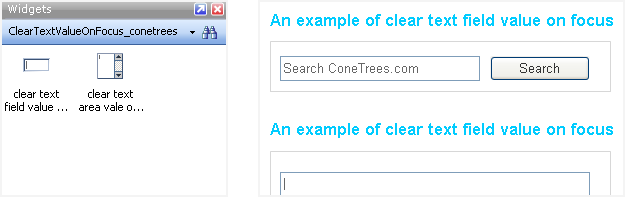
Two Axure widgets (clear text on focus of text field & clear text on focus of text area) for the Input Prompt design pattern are available for download in Axure widget library (.rplib) and and project file (.rp) format.

Demo the Clear Input Field Value on Focus Axure widgets

Demo (opens in new window, 105 kb)

Watch an example video


(File size: 330 kb)

Download

Clear text value on focus of input field- Axure Widget Library file (.rplib) (downloaded 2115 times)
Clear text value on focus of input field- Axure Project file (.rp) (downloaded 962 times)

Creative Commons License
Axure Widgets for the User Interface Pattern: Clear Input Field Value onFocus/ Input Prompt by Abhay Rautela is licensed under a Creative Commons Attribution-Noncommercial-Share Alike 2.5 India License.

5 Comments

  1. Shannon said on September 30, 2009 at 10:57 pm |

    I found this just when I needed it. Thanks!

  2. Jan said on May 6, 2010 at 1:40 pm |

    Hi Abhay,
    I was looking at your Axure RP widget (Clear Text Field Value). In your online demo, I really like the way the widget’s formatting changes based on the interaction i.e. when on focus, the text box’s borders turn to yellow. I downloaded both the widget and the prototype files but in both the behaviour is different.

    May I ask how you achieved this?

    Thanks

    PS - BTW great widget, using it a lot.

  3. Abhay (Cone Trees) said on May 6, 2010 at 9:43 pm |

    Jan, good to know you use it a lot.

    To answer your question, I haven’t applied any CSS that makes the text box’s border turn yellow. You happen to be viewing the demo on a browser that applies that styling to input elements on pages viewed in it. An example of such a browser is Chrome. View the demo in IE or Firefox on a PC and it shouldn’t appear.

    By the way, this may help you. The code that is used in Chrome for the yellow border styling for input elements is this: input:-webkit-autofill { background-color: #FAFFBD !important; background-image:none !important; }

  4. Jan said on May 6, 2010 at 10:47 pm |

    Thanks Abhay… now I feel like a fool… I was indeed using Chrome

  5. 栗伟 said on June 29, 2010 at 2:47 pm |

    HI ,I am chinese,your website big big good !!

Have something to say? Post a Comment

Your email is never published nor shared. Required fields are marked *

*
*